Personal project
AI Text Humanizer Lite
A small rule editor that strips formulaic phrasing out of English and Chinese text while leaving code, URLs, paths, numbers and quotes untouched. No account, no server: the edits happen in your browser.
Rule editor Free basic
This is the free basic version: a short, high-confidence list of clichés, up to 2,000 characters, with code, URLs, paths, numbers with units and quoted spans protected from every rule. The paid Pro version is below.
Runs the fine-tuned T5 checkpoints, takes longer input and covers more languages. This free basic page applies a fixed rule list locally.
Continue on lynote.ai ↗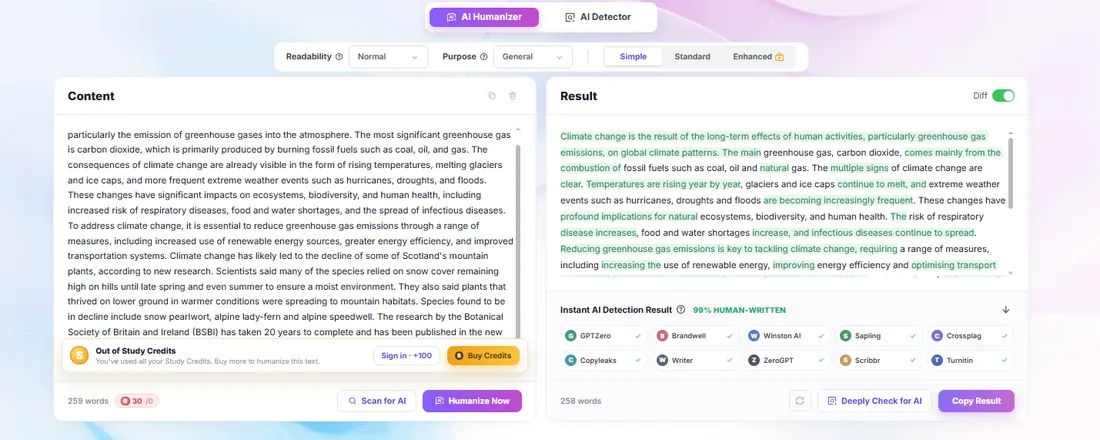
What is an AI humanizer?
An AI humanizer rewrites machine-generated text so it reads more like something a person
would write: fewer stock transitions, less repetition, simpler wording. Most humanizers are
language models in disguise. This one is a rule editor — it applies a short,
published list of clichés and clean-up rules, then tells you exactly which phrases it
changed. That makes it predictable: the same input always produces the same output, and you
can read every rule in app.js.
Use cases: where a humanizer helps
If you write with AI assistance, the problem is rarely the facts — it is the voice. These are the places where a light editing pass makes the biggest difference.
Blog posts and SEO content
Drafts written with ChatGPT often open with the same padding — “in today’s rapidly evolving world”, “it is important to note that”. Stripping that makes an article easier to skim without touching your headings, keywords or internal links.
Marketing and product copy
Product descriptions and landing pages go stiff fast when a model writes them. The rule editor removes the sales filler and leaves your claims, prices and numbers exactly where they were.
Emails and business messages
A short note reads better without “I hope this email finds you well” and “please do not hesitate to reach out”. Natural and Concise are enough for most drafts.
Social media captions
Captions that begin with “in the realm of” do not sound like a person typing. Trimming the clichés makes a post feel written rather than assembled.
Non-native English drafts
If you draft in English but think in another language, filler creeps in from both directions. This editor has separate English and Chinese rule sets, and it protects code, URLs and quoted text in both.
Editing your own writing
Use it as a final pass on words you wrote yourself. It is a wording tool, not a way to disguise authorship — see the note below.
How to humanize AI text in three steps
- Paste your draft. Up to 2,000 characters. Code, URLs, paths, numbers with units and quoted spans are protected automatically.
- Pick a voice. Natural removes clichés, Concise also drops intensifiers, Professional swaps casual wording for a formal equivalent.
- Read the change list. The note under the result names every phrase that was replaced, so nothing changes silently.
Lite vs Pro
| Lite (this page) | Pro on lynote.ai | |
|---|---|---|
| Price | Free | Paid plan |
| Engine | Fixed rule list, visible in the page source | Fine-tuned T5 checkpoints |
| Input limit | 2,000 characters | Longer documents |
| Languages | English and Chinese rules | More languages |
| Privacy | Runs in your browser | Server-side processing |
Frequently asked questions
What is an AI humanizer?
An AI humanizer rewrites machine-generated text so it reads less like a template: fewer stock transitions, less repetition, plainer wording. This one is a rule editor rather than a language model, so the same input always produces the same output and every rule is visible in the page source.
Is this AI humanizer free?
Yes. The free basic build needs no account, no payment and no upload, and it handles up to 2,000 characters per run. The paid Pro version, which runs the fine-tuned T5 checkpoints, is linked at the bottom of the page.
Will humanized text pass AI detectors?
No tool can promise that, and you should be sceptical of any that does. Detector scores are probabilistic and change as the detectors are retrained. This editor removes known clichés and tidies whitespace; it does not rewrite sentences or optimise against a specific detector, so treat the output as a light editing pass rather than a guarantee.
Does humanizing change the meaning?
It only replaces phrases from a fixed list and cleans up spacing, so it cannot invent new claims or drop your arguments. You should still read the result before publishing — the change list under the result tells you exactly what was replaced.
Does it work for Chinese text?
Yes. English and Chinese have separate rule sets, and protected spans — code, URLs, file paths, numbers with units and quoted text — are skipped in both languages.
Do I need an account to humanize AI text?
No. Paste your text, choose a voice and click Humanize text. Nothing is gated behind a sign-up.
Is my text uploaded to a server?
No. The rules run inside your browser. There is no backend for the editor, so the text you paste never leaves your device.
What is the difference between Lite and Pro?
Lite, this page, is a fixed rule list that runs locally and is free. Pro runs the fine-tuned T5 checkpoints on lynote.ai, accepts longer input and covers more languages; it needs a paid plan and a Python runtime, which a static page cannot provide.
Use it honestly
This is a writing-quality aid, not a tool for misrepresenting authorship. Do not use it to pass off generated text as your own in academic, legal or disciplinary settings, and do not treat a detector score as proof of anything. If you are editing someone else's work, say so.
Related
Checking whether a draft still reads as machine-written is the other half of the job — the AI Text Detector on this site runs a transparent four-signal check in your browser.
Pro runs the fine-tuned T5 checkpoints, with longer input and more languages.
Continue on lynote.ai ↗